

Gmail adds External label for emails with recipients outside domain
While the reply warning banner is displayed when responding to emails sent from outside of your domain and not in their contacts, the new external label appears when you compose a new message to an external recipient.
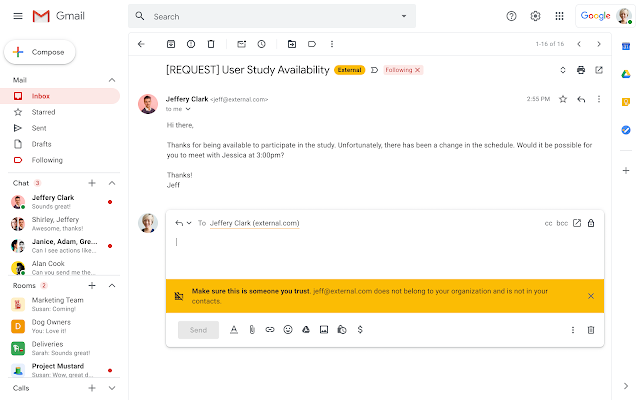
In addition to the existing external recipient warning banner, Gmail is adding a new 'External' label for email threads with recipients outside your organization or contacts.
While the reply warning banner is displayed when responding to emails sent from outside of your domain and not in their contacts, the new external label appears when you compose a new message to an external recipient.
The "External" label and the reply warning banner and label are helpful reminders for users to treat external messages with caution. This can help avoid unintentionally sharing confidential information with recipients outside of their organization," Google said.
It is worth noting that secondary domains and domain aliases will be exempted from being labelled as "External" as they are treated like primary domains.
The External label will be visible on Gmail on the web and Android devices with iOS to follow later. The new security feature will be available to all Google Workspace customers, as well as G Suite Basic and Business customers.
How to turn external recipient warnings on in Gmail?
The external recipients setting in Gmail controls both the External label and warning banner. To turn this setting on, follow these steps:
- Sign in to your Google Admin console
- From the Admin console Home page, go to Apps > Google Workspace > Gmail > End User Access
- Select your top-level organization
- Scroll to the Warn about external recipients setting
- Click the checkbox to turn warnings on or off
- Click Save
When enabled by your admin, you will see both the "External" label and a warning banner when interacting with or replying to email threads with recipients outside your organization or contacts.
It is worth noting that it can take up to 24 hours for you to get these alerts after your admin turns them on for you.


 Google News