

View Source feature now available for emails in new Outlook for Mac
The View Source feature in the new Outlook for Mac is available to Beta Channel users running Version 16.51 (Build 21062402) or later.
- Country:
- United States
Microsoft on Thursday announced the availability of the "View Source" feature for email messages in the new Outlook for Mac, allowing you to view all the information about the source of an email.
For instance, by checking the header information, you can discover if the message is spam and easily add it to your list of blocked senders. Email headers provide a list of technical details about the message, such as who sent it, the software used to compose it, and the email servers that it passed through on its way to the recipient.
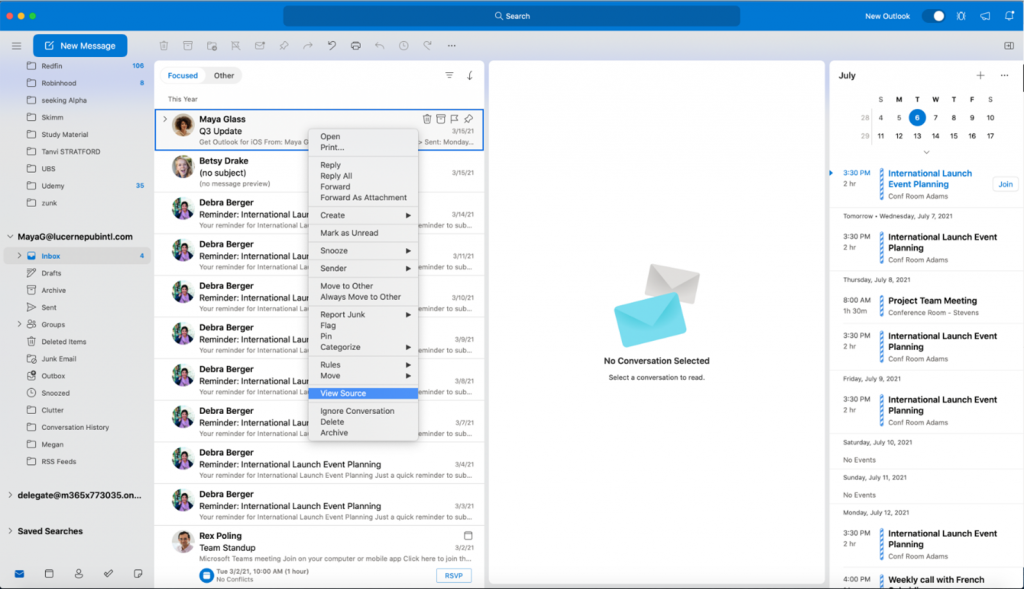
To view the full email header in Outlook for Mac:
- Right-click the email in the message list
- Select View Source in the context menu
- You can review the email header information in the default text editor
The View Source feature in the new Outlook for Mac is available to Beta Channel users running Version 16.51 (Build 21062402) or later.
"Viewing all the information about the source of an email is one of the best ways to check its authenticity and assess whether it's a spam or phishing message with a spoofed address," Priya Ganta, Program Manager on the Outlook for Mac team, wrote in a blog post.


 Google News