



New default setting for content managers to share folders in Google shared drives
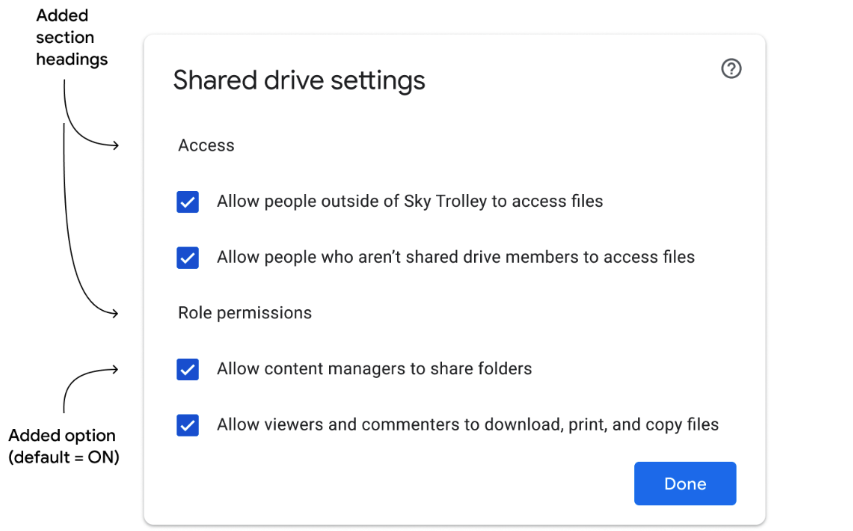
Google has added the ability for all content managers to share folders by default in shared drives - special folders in Google Drive that you can use to store, search, and access files with a team. The new setting adds to their current ability to edit, reorganize, and delete shared drive content.
The new feature will help organizations better manage access to their data. It will be available to Google Workspace Essentials, Business Standard, Business Plus, Enterprise Essentials, Enterprise Standard, Enterprise Plus, Education Fundamentals, Education Plus, Education Standard, the Teaching and Learning Upgrade, and Nonprofits, as well as legacy G Suite Business customers.
Google Workspace admins can disable the setting for content managers to share folders, go to the "Sharing settings" in the Drive and Docs section of the Admin Console > scroll to the "Shared drive creation" section > change the "Allow content managers to share folders" setting to OFF.
"Only newly created shared drives will automatically inherit the new default setting based on the admin preferences. All existing shared drives will keep the old behaviour, and can be updated as needed," Google wrote in a blog post.
Additionally, Google is introducing a new Drive API method that allows developers to update the new shared drive setting for content managers to modify shared drives programmatically. The new Drive API is gradually rolling out to both Rapid Release and Scheduled Release domains and may take up to 15 days to be fully visible.
- READ MORE ON:
- shared drives
- sharing folders in shared drives
- Google Workspace


 Google News