

Gmail adds the ability to resize Chat and Rooms sections on web
The ability to resize the Chat and Rooms section on Gmail is rolling out to both Rapid and Scheduled Release domains and will take a couple of days for it to be fully visible.

- Country:
- United States
Google has added the ability for Gmail users to resize the Chat and Rooms sections in the left-side navigation on the web version, making it easier for them to stay on top of their most important conversations and navigate to relevant chats faster.
There is no admin control or end-user setting for this new feature. To resize a section, hover over a section header and drag - up or down - to adjust as needed. You can make it longer or shorter based on your needs.
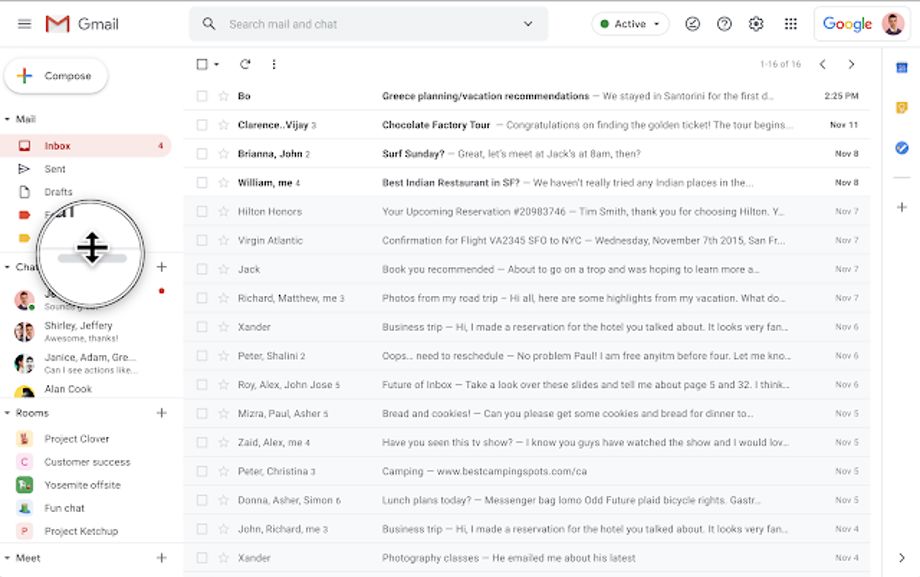
Image: Resizing the Chat and Rooms sections on Gmail on the web / Credit: Google
The ability to resize the Chat and Rooms section on Gmail is available to Google Workspace Essentials, Business Starter, Business Standard, Business Plus, Enterprise Essentials, Enterprise Standard, and Enterprise Plus, as well as G Suite Basic, Business, Education, Enterprise for Education, and Nonprofits customers.
The new functionality on Gmail web is rolling out to both Rapid and Scheduled Release domains and will take a couple of days for it to be fully visible.


 Google News