

New options added to join meeting from Google Meet landing page
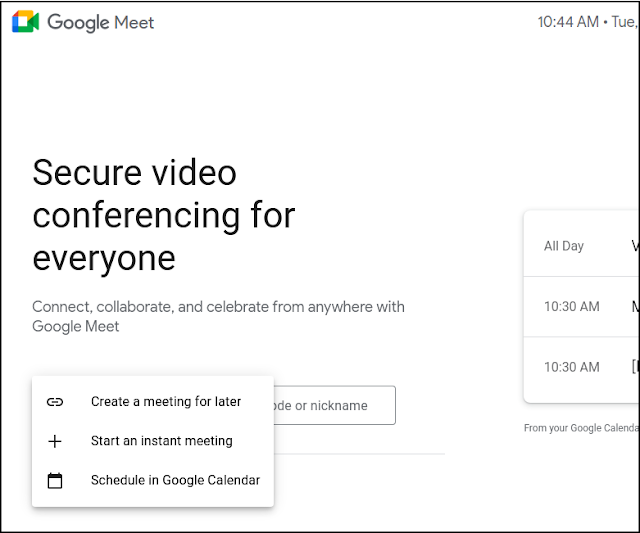
With the addition of three new options- 'Create a meeting for later', 'Start an instant meeting' and 'Schedule in Google Calendar' - Google says Meet users will get a more tailored experience. Users will still be able to enter a meeting code or nickname to join a meeting.
- Country:
- United States
Google has added three new options for Workspace users to join or start a meeting from the Meet landing page i.e. meet.google.com, the company announced on Thursday.
With the addition of three new options- 'Create a meeting for later', 'Start an instant meeting' and 'Schedule in Google Calendar' - Google says Meet users will get a more tailored experience. Users will still be able to enter a meeting code or nickname to join a meeting.
To start meeting from Google Meet, head over to the landing page and click 'New Meeting'. Choose any of the below options:
Create a meeting for later: Generate joining information for a new meeting. To share the meeting details with participants for a future meeting, copy the meeting link and share with participants
Start an instant meeting: Create a new meeting and join it directly, without first going to the Meet greenroom. Once in the meeting, you can add others or copy the joining information to share. When using this option, your camera and microphone will be on automatically and you can turn them off once in the meeting.
Schedule in Google Calendar: Go to Calendar in a new tab to create an event with Meet conferencing details automatically populated.
The new options are gradually rolling out to Rapid Release starting January 7 and to Scheduled Release domains starting on January 21, 2021. It will take up to 15 days for feature visibility.
Google Workspace Business Starter, Business Standard, Business Plus, Enterprise Essentials, Enterprise Standard, and Enterprise Plus, as well as G Suite Basic, Business, Education, Enterprise for Education, Nonprofits customers and users with personal Google Accounts, will have the new options to join a meeting on Google Meet.
Notably, 'the Schedule in Google Calendar' option will not be available to Google Workspace Essentials customers but they can join or start a meeting through the other two options.


 Google News