

Mentioning other user in Google Docs comment now shows OOO information
If you mention a single user, you'll see the OOO banner and information on when they plan to return while for multi-person threads, you'll see condensed out of office information. To view more information on each specific person, you can select the info icon.
- Country:
- United States
When replying to or mentioning a user in a new comment or thread in Google Docs, Google Workspace customers will now automatically see out of office (OOO) information, Google announced on Tuesday.
If you mention a single user, you'll see the OOO banner and information on when they plan to return while for multi-person threads, you'll see condensed out of office information. To view more information on each specific person, you can select the info icon.
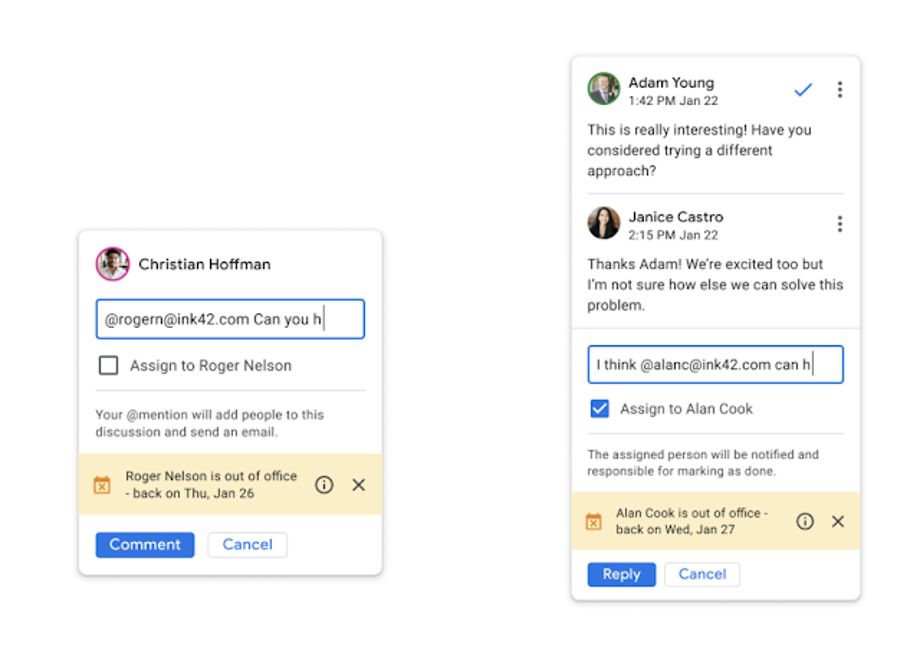 Image Credit: Google
The new OOO information feature is gradually rolling out to Rapid Release domains and it will take up to 15 days for feature visibility. On the other hand, Scheduled Release domains will receive it starting on February 15, 2021.
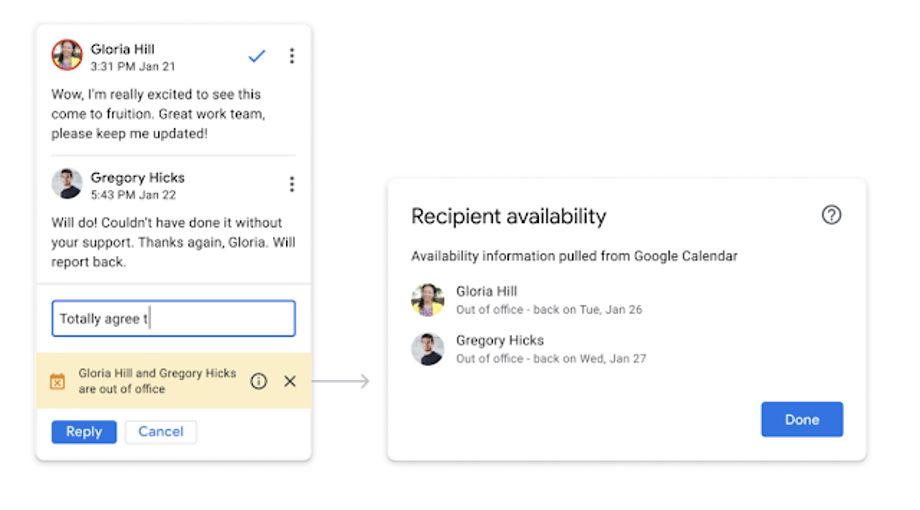
Image Credit: Google
This feature will be available to Google Workspace Essentials, Business Starter, Business Standard, Business Plus, Enterprise Essentials, Enterprise Standard, and Enterprise Plus, as well as G Suite Basic, Business, Education, Enterprise for Education, and Nonprofits customers.
There is no admin control for this feature. Also, end-users require no action to get started.


 Google News