



New features make it easier to customize tables in Google Docs
Next up, you can now sort tables to quickly visualize, understand, and organize your data better. It is worth mentioning that any pinned table headers will remain at the top of your table.
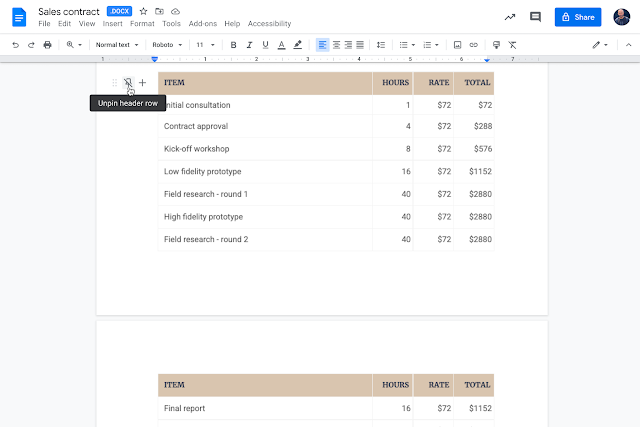
Google is adding several new ways to customize tables in Docs, making it easier for viewers to quickly see and understand the information.
Firstly, you can now pin one or more rows in a table so they repeat on each page that the table appears on. This will make it easier to see column headers for long tables as you navigate a document.
Secondly, you can also designate that a table row should not be split across pages, ensuring important content in tables sticks together and isn't missed on the next page. This also provides more control over formatting and layouts.
Thirdly, you can now easily drag a row or column to a different location. There is also a new, intuitive button for creating new rows or columns.
Next up, you can now sort tables to quickly visualize, understand, and organize your data better. It is worth mentioning that any pinned table headers will remain at the top of your table.
Lastly, you can use a new sidebar to manage table properties and see edits reflected in your document in real-time. This is similar to functionality already available in docs for things such as image editing.
The new features are currently rolling out to Rapid Release domains and may take more than 15 days to be fully visible. The extended rollout for Scheduled Release domains will start on December 22, 2021. The features will be available to all Google Workspace customers, as well as G Suite Basic and Business customers Available to users with personal Google Accounts.


 Google News