



You can now split table cells in Google Docs

Google has added the ability for Workspace users to split table cells into a desired number of rows and columns in Google Docs, making it easier to organize information.
To split cells, open a Doc > right-click the cell > click Split cell > enter the number of rows and columns you want > click Split.
"We hope this highly requested feature improves upon your ability to organize information with tables in Docs," Google said.
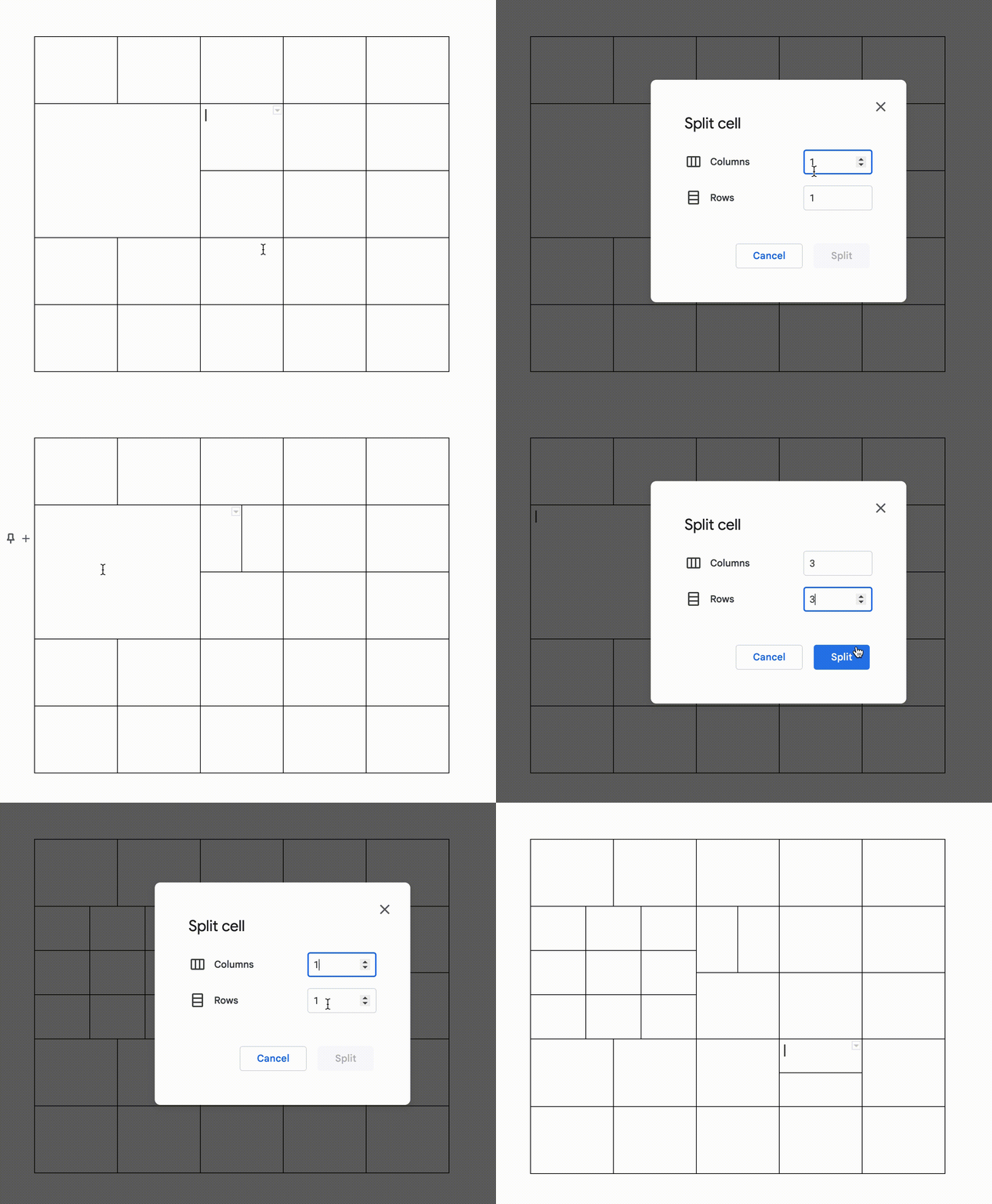 Gif Credit: Google Workspace Updates
The functionality is gradually rolling out to Rapid Release domains and may take up to 15 days to be fully visible. For Scheduled Release domains, the gradual rollout will begin on October 31, 2022. It will be available to all Google Workspace customers, legacy G Suite Basic and Business customers as well as to users with personal Google Accounts.
Google is also updating the menus in Google Slides and Google Drawings to make it easier to locate the most commonly-used features. The update brings shortened menus for better navigation, reorganization for more intuitive feature location and prominent icons for faster recognition. Google says the new design improves the findability of key features, making it quicker and easier to use Slides and Drawings. The changes are rolling out to all Workspace customers, G Suite Basic and Business customers and users with personal Google Accounts.
- READ MORE ON:
- Google Workspace
- Google Docs
- split table cells in Google Docs


 Google News