

New setting allows you to block all third-party API access to Google Workspace data
By restricting third-party APIs from requesting sensitive information like login or email scopes, Workspace users can ensure their data and user data stays secure. With all third party API access blocked, an app will not be able to access any Workspace user data, across the web as well as mobile.
Google has introduced a new setting that allows users to block all third-party API access to Workspace data, adding another layer of protection over the Workspace and end-user data.
With the new setting on, requests by all third-party apps are denied access to Workspace and end-user data, blocking all OAuth 2.0 scopes including sign-in scopes which means that users cannot use their Google Workspace accounts to sign into third-party apps and websites.
By restricting third-party APIs from requesting sensitive information like login or email scopes, Workspace users can ensure their data and user data stays secure. With all third party API access blocked, an app will not be able to access any Workspace user data, across the web as well as mobile.
If users try to use their Google Workspace account to access an unauthorized application, they'll see an authorization error message.
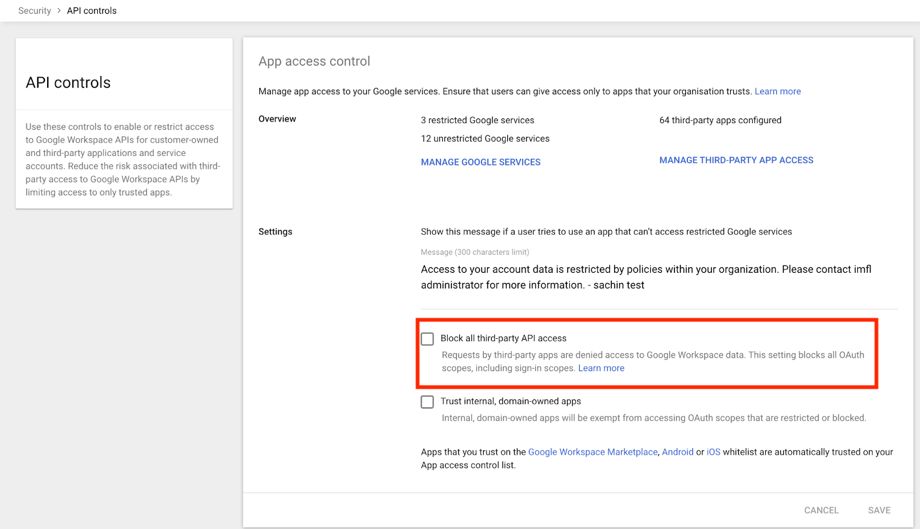 Image Credit: Google
The new setting complements other available OAuth settings which help you control which third-party and internal apps access Google Workspace data.
To turn on the new setting, in the Admin console head over to Security > API controls and select "Block all third-party API Access". The setting is now rolling out to both Rapid Release and Scheduled Release domains.
The new setting is available to all Google Workspace customers, as well as G Suite Basic and Business customers.


 Google News