

Enterprise Multi-Screen Workflow Use Cases in Finance, Design, and Sales
Discover how multi-screen setups are enhancing workflows in finance, design, and sales. Learn how dual and portable monitors are making enterprises more productive and efficient.

Fast, informed decision-making and precise data visualization are key to modern enterprises. However, as professionals work with dashboards, design projects, or sales presentations, the number of displays available to them often doesn't meet multitasking demands. Tab switching wastes time and increases the risk of missing vital information.
Professionals in finance departments, design studios, and sales offices are routinely challenged by this issue when they need to work smart and fast.
The solution is to integrate multi-screen setups using portable and dual displays. Lightweight products like the uperfect dual monitor and 4k portable monitor let users multitask more effectively by using multiple screens in tandem.
They make it possible to view, edit, and share information in real time, without having to switch back and forth manually. Let's take a look at how various teams are using these monitors to boost speed and accuracy in different scenarios.
The Rise of Multi-Screen Workflows in Modern Enterprises
Enterprises are adopting display solutions that support more seamless multitasking and real-time collaboration. A multi-screen workflow enables users to open multiple applications, view data side by side, and track live metrics with fewer constraints.
Adopting this display paradigm is a practical step toward improving enterprise productivity. Financial teams can monitor multiple dashboards, designers can preview their work on different monitors, and sales teams can present and share key information more clearly with stakeholders.
As hybrid and remote work options become commonplace, portable, flexible displays are also becoming more popular. Easy-to-integrate technologies like USB-C connectors and HDMI 2.1 enable dual and portable monitors to connect to any laptop, computer, or tablet without extensive configuration. As a result, enterprise teams are integrating these solutions to build an optimal and cohesive setup that increases enterprise productivity and collaboration across departments.
1. How Financial Teams Overcome Data Overload with Multi-Screen Workflows
Handling Complex Data on Dual Screens
Finance teams are often on call to deliver data, reports, or budget reviews. During these instances, analysts often have several live tabs to reference. A dual screen setup gives them the space to work with spreadsheets, live dashboards, and reports side by side. The uperfect dual monitor allows analysts to have forecasts open while they compare portfolio performance or market share on a secondary screen. It keeps tabs open simultaneously, which improves focus and minimizes errors.
Perform Better Risk Analysis and Reporting
Accurate risk analysis, revenue forecasting, and reporting require the ability to cross-reference data points with agility. Financial teams that analyze live metrics and create financial reports side by side are less likely to make errors. A multi-screen workflow increases visibility and enables finance teams to visualize all required information, identify trends more quickly, and share analysis or comments during real-time conversations.
Remote Collaboration in Finance Departments
Remote teams in finance can benefit from a portable monitor that makes virtual meetings and real-time reporting easier. A lightweight 4k portable monitor can be used in tandem with a laptop or tablet to maintain visibility across different documents during live presentations and calls. It increases transparency and keeps operations running smoothly in distributed teams.
2. Solving Creative Workflow Limits with Dual and Portable Monitors
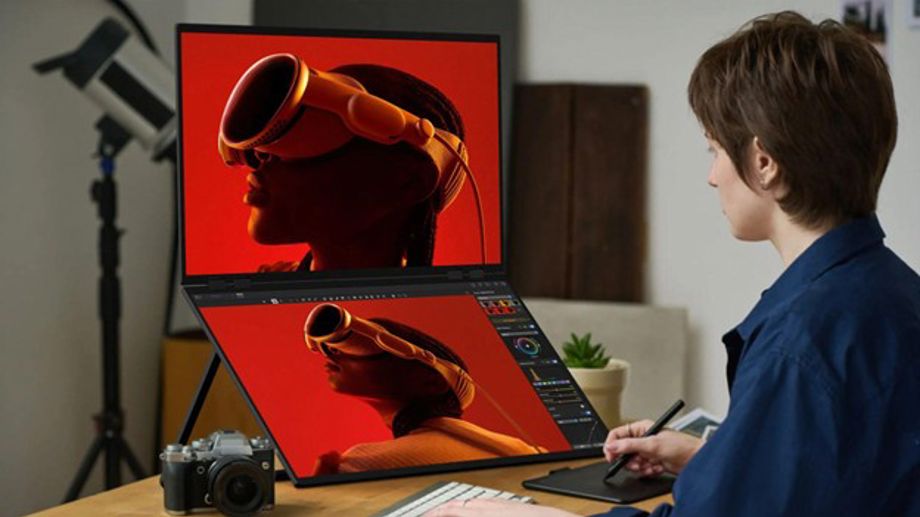
Expanding the Digital Workspace for Creatives
Creative teams depend on extensive, detailed visuals to produce high-quality work. A dual monitor system expands the available workspace and allows for side-by-side editing and previewing of creative work. Designers using the uperfect dual monitor can focus on their main editing application on one screen and use the second screen for reference resources, design specs, or communications tools. This uninterrupted workflow minimizes disruption.
Working with Large File Sizes, 3D Modeling, and Color Accuracy
Graphic designers, architects, and video editors typically work with high-resolution assets and rely on accurate color matching. A 4k portable monitor provides sharper detail and better color precision, ideal for 3D modeling software, video timelines, and CAD (computer-aided design) user interfaces. The second screen can also free up workspace to manage toolbars and preview renders while users focus on their primary application.
Faster Feedback, Editing, and Collaborative Sharing
Dual screen setups make it easier for creative teams to exchange ideas, make real-time edits, and present visual updates. Getting feedback and notes from teammates is also simpler when information is visible in real time. The setup works well for remote collaboration and moving projects along with clients and external partners.
3. Smarter Sales Meetings: Using Dual Monitors to Engage Clients Better
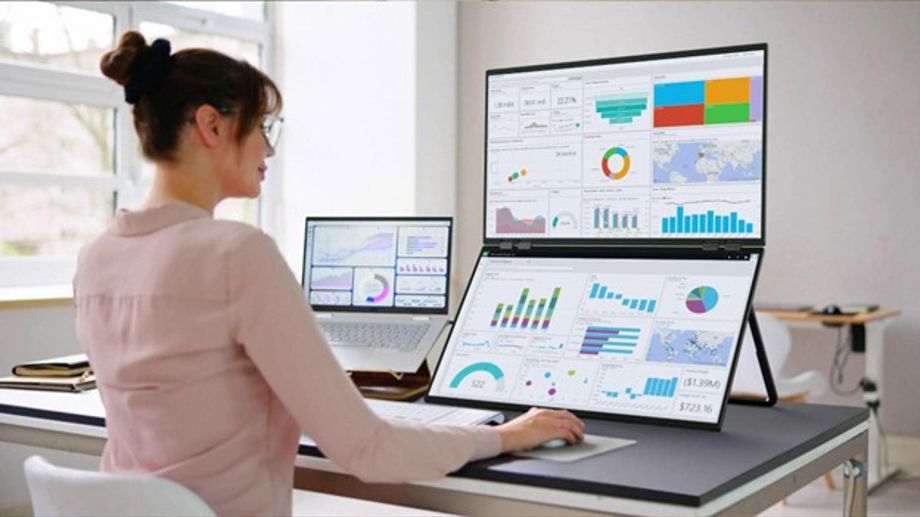
Pitching, Presentations, and Webinars with Multi-Screens
Sales professionals frequently make product demos, host client calls, and conduct webinars. Working with multiple screens increases their ability to juggle presentation slides, customer data, or chat programs simultaneously. A 4k portable monitor enables them to display visuals on one screen while having notes and key analytics open on a secondary display. The result is a more engaging, organized, and professional presentation.
Remote Selling, Efficiency, and Speed
Remote selling is faster and more efficient when customer profiles and sales dashboards are open on multiple screens. Sales representatives are able to track leads, engage with clients, and display key information at the same time. It also eliminates delays when transitioning from one customer interaction to the next, keeping teams ready to respond to inquiries.
Travel-Friendly Screens for Sales Teams
Portable monitors are compact and easy to configure. Sales teams that travel frequently can benefit from displays that are light enough to fit in laptop bags or backpacks. The plug-and-play format on dual and portable monitors makes it easier to connect to a laptop or tablet without requiring complex configurations. It also works well for hybrid sales teams that operate using both remote and in-office communication.
Key Advantages of Multi-Screen Workflows in Diverse Industries
The benefits of a multi-screen workflow are increasingly being recognized across finance, design, and sales departments. The advantages of using a dual monitor system for professionals range from higher comfort to better focus and accuracy for different tasks.
- Minimized distractions and increased focus: There is less need to manually switch between multiple windows.
- Better multi-user collaboration: Multiple people can view and respond to changes at the same time.
- Improved accuracy: The chance of error decreases when information can be accessed in parallel.
- Faster operations: Activities such as reporting, editing, and live pitching can be completed more quickly.
- Enhanced ergonomics: Users are able to adjust each display for a more comfortable view and reading angle, which is better for long work sessions.
Overall, these factors have a direct and measurable impact on productivity and performance for enterprise teams.
How to Find the Right Dual and Portable Monitor Setup for Your Business
Finding the right dual or portable monitor depends on your team and work style. Before making a selection, consider these major criteria:
1. Display Resolution and Size
Resolution needs depend on industry, with a 4k portable monitor providing superior detail for design and financial data. Size should complement laptop or desktop setups, with 1080p or 4k displays used based on image requirements and personal preference.
2. Connectivity Options and Ports
USB-C and HDMI 2.1 are two of the most practical and fastest connectors for most users, with both ports needed for future-proof and flexible options. Most portable monitors are compatible with laptops and desktops, so it's practical to look for a configuration that supports both.
3. Refresh Rate, Brightness, and Other Specs
Monitors with a 60Hz refresh rate or more ensure smoother operations, especially for design and video applications. A brightness of 300 nits or more enables viewing in most indoor settings.
4. Portability and Durability
Enterprises benefit from slim displays with sturdy hardware that are capable of moving from one office to another without risk of damage. The uperfect dual monitor is built for mobility and features the latest stable connectors for compatibility.
5. Compatibility and Support
Check that your system is able to support dual and extended display mode and can be made to work with your operating system (Windows, Mac OS). Plug-and-play portable monitors are available on the market, which allow for easy setup in a few seconds.
Dual and Portable Monitors: The Future of Enterprise Productivity
The adoption of remote and hybrid work is set to impact how modern businesses operate. Multi-screen workflows have become more practical in the enterprise context for professionals in finance, design, and sales who need visual clarity and efficient multitasking to do their jobs.
Screens like the uperfect dual monitor and 4k portable monitor offer flexibility and high performance to the corporate environment without being complex or cumbersome to set up. Dual and portable monitors improve productivity for the enterprise by expanding the workspace and improving multitasking efficiency. As a result, teams get faster speed, better precision, and consistent output. For all these reasons, multi-screen setups are fast becoming a standard and practical requirement for any team that values speed, clarity, and precision above all else.
FAQs
Q1: How do multi-screen setups make it easier to work?
It's faster and easier to view multiple documents or applications simultaneously without having to switch tabs.
Q2: Are portable monitors good for work tasks?
Yes. High-quality portable monitors like the 4k portable monitor have color accuracy and resolution suited to business operations.
Q3: Are dual monitors useful for finance and design teams?
Yes. Finance teams use them to compare data and analytics, while design professionals use it for editing and designing on two interfaces at a time.
Q4: What makes the uperfect dual monitor ideal for enterprises?
It's portable, lightweight, easy to set up, and provides clear visuals that support better collaboration and multi-tasking in real time.
(Disclaimer: Devdiscourse's journalists were not involved in the production of this article. The facts and opinions appearing in the article do not reflect the views of Devdiscourse and Devdiscourse does not claim any responsibility for the same.)


 Google News