

Secure your WhatsApp messages with fingerprint lock: Here's how to enable it
Furthermore, there is an option to hide the message content from appearing in the notifications.

- Country:
- India
Facebook-owned WhatsApp has rolled out an extra layer of security for private messaging, more specifically, the fingerprint authentication for Android devices, allowing users to unlock their chat app with a fingerprint.
To enable the feature, users need to update their WhatsApp to the latest version and then:
- Go to WhatsApp Settings
- Tap on the 'Account' option and then on 'Privacy'
- Tap on 'Fingerprint Lock'
- Turn on 'Unlock with fingerprint', and confirm the fingerprint
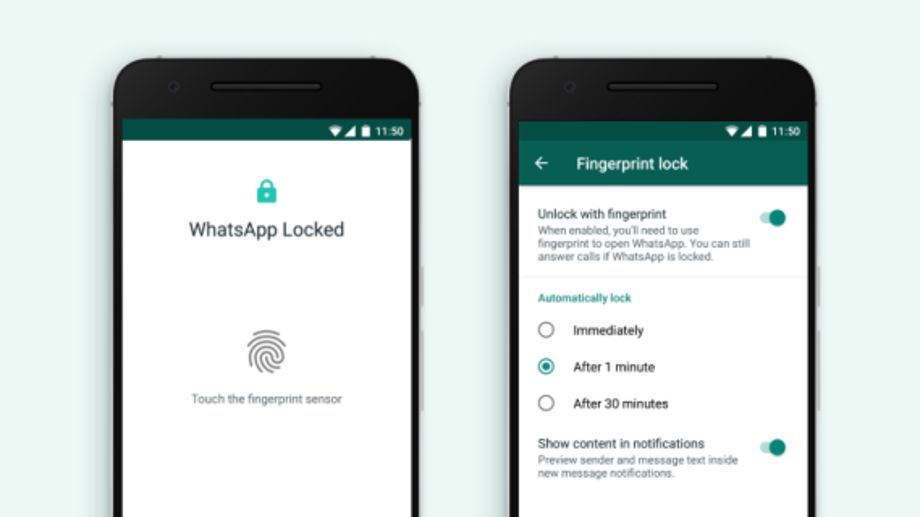
Users can also select options to automatically lock the app upon closing, after one minute or after 30 minutes. Furthermore, there is an option to hide the message content from appearing in the notifications.
To recall, the popular instant messaging platform, earlier this year, introduced Touch ID and Face ID authentication for iPhone to help prevent others from accessing the app and reading messages. The feature was rolled out for iPhone 5s or later models and on iOS 9.


 Google News