

Want to Speed Up Your Elementor Theme? TemplateMonster Shares Some Proven Tips

Being a decade in the web design industry, TemplateMonster is a one-stop shop for world-class digital products. It's a marketplace with 200K+ premium products, and it's worth a visit because you can enjoy it for $7.45/month. And when speaking of Elementor themes, 2K+ beautiful designs is a big choice. And it's only one of a dozen popular WordPress page builder extensions.
And after all the good you heard about this builder, you decide to try it for your next business project. Later, during the customization, you might find out that the load speed is at its low end. Now you might think that you have chosen the wrong option. How could that come?
How Elementor Hurts SEO
Is Elementor a reason that hurts SEO?
The quick answer is Yes.
Should you skip Elementor?
No, not at all.
For justice, let's admit that all page builder extensions affect the load speed. And the reason is hiding in the core – code. Let's see an example.
With WordPress Editor, your code output looks like this:
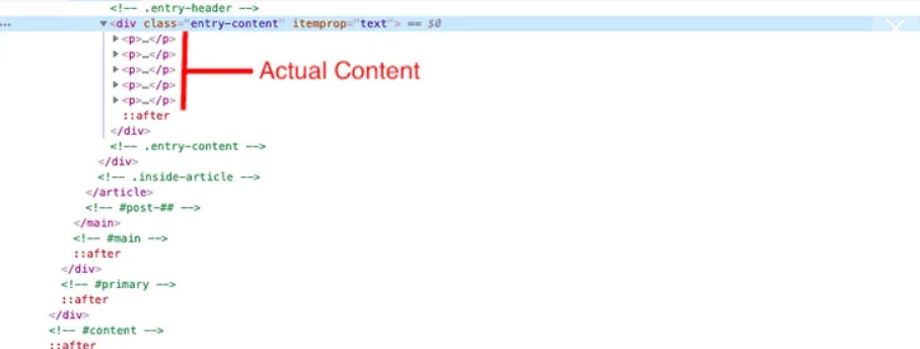
Now, look what your code output looks when using Elementor:
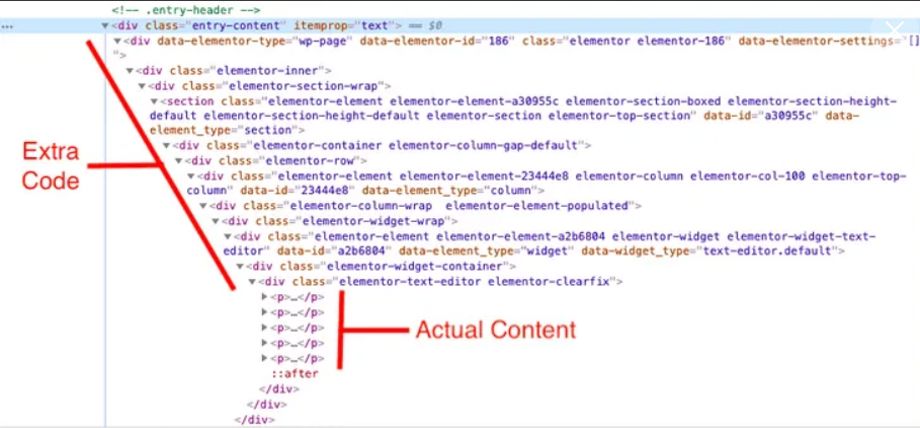
It is pretty bloated. Also, it isn't super clean. The more code, the longer your web server needs to load that design. As a result, it makes it load longer, affecting your SEO. But there is something you need to know.
You can build something complicated and make something simpler, but you have the power to create whatever you want. And that superpower is hiding inside the code.
So, when you know this builder isn't the fastest, you must fine-tune your pages after building them. So, you don't make the whole thing but add, edit, or delete a couple of things.
Proven Tips to Make Your Website Load Faster
Several issues like the heavy elements, large images, or server errors are the reason behind a slow web page. Let's go down the list of main issues and the effective ways to solve them.
#1 Hosting matters
The wrong provider will do anything good for your web performance. Ensure your provider uses up-to-date hardware (SSD and Linux servers) and supports the latest software (PHP 7+, MySQL 5.6+). And that shouldn't be shared hosting. That is because it is simply slower than other hosting offerings out there.
If you are unsure about your provider, please do your homework.
#2 Opt for a lightweight option
You should focus the search for the right theme on finding the one that is lightweight and optimized for performance from the start. Also, it must be mobile-friendly and offer a fast loading time.
Switch to a lightweight theme, reducing one-fourth of your site loading time. Combining an optimized theme and decent hosting is a win-win for any website.
#3 Optimize images
High-quality images are bread and butter for modern websites. Users don't like to read. What they want is to be engaged. And professional photography does that job excellently.
The thing is that images comprise 75 percent of the weight of your file. So, there is only one way out to optimize your images. Where possible, use smaller photos and then compress them.
#4 Clean CSS and JS files are promising
In war, as in web design, all shots are allowed. Make your CSS and JS files clean. It is up to you to decide which way to go: concatenation or minification. The difference is obvious; both help clean your code and make your WP site faster.
#5 Eliminate slow plugins
You want your digital spot to perform outstanding, providing an excellent shopping experience for anyone who lands on it. That is easy to do by expanding its functionality with plugins. With over 57K of plugins in the WP directory, it is hard not to go crazy with those add-ons. And that's where the problem begins.
Every extension you install makes your file heavier, impacting SEO. Sometimes there's a better option than the Delete button. Disable features that are no longer relevant. Some plugins with a modular design let you do that.
#6 Invest in A Better Cache Plugin
There are several ways to do that. For one, you create a static HTML version of your webpage and cache it. This way, it stops forcing the server to generate the page from the database. If you have fully managed WP hosting, that option comes inbuilt.
Alternatively, you use special plugins like FlyingPress, LiteSpeed Cache, or WP Rocket. Try them to know which one works for you best.
There are even more ways to make your site speedy. Remove unused database tables, use CDN to store a copy of your site across different locations worldwide, and increase the memory limit.
Undeniable, Elementor is one of the fastest and most effective ways of creating beautiful websites. And you need to keep an eye on your site performance to get the best results. The good news about premium templates is that they come with customer service, so you are not alone. So, whenever you need a helping hand, click here and get issues solved.
Elementor Theme FAQ
Where to Find the Best Elementor Theme?
The choice for premium products is extremely wide nowadays. Many marketplaces promise to play well with Elementor. In reality, most of them don't deliver the result you expect to get. With TemplateMonster, you are more likely to get what you want. We don't promise; we practice.
What Are the Extra Services for Elementor Themes?
There are many. It is better to check your options before you go to the checkout.
How to Choose the Best Elementor Theme?
It is better to use an advanced search and filter the options you are more likely don't need. Also, you can sort results by date, rating, or price.
What Hosting Service Provider Works for Elementor Themes?
We recommend you check the best hosting offers from several prominent providers we team up with. Take the time to learn the review page to make the right choice. Need help? Contact us, and we will see how we can help.
(Devdiscourse's journalists were not involved in the production of this article. The facts and opinions appearing in the article do not reflect the views of Devdiscourse and Devdiscourse does not claim any responsibility for the same.)


 Google News